What color is that?
Are you starting to program and don't understand how to give the color you want to an element on the screen? Sure, you can "google" it or use ChatGPT, but why not understand it?
Quick Color Theory
Yes, I know... you've read theory and almost closed the browser, but let me explain it very simply.
The RGB model (red, green, blue) or RGBA (red, green, blue) combines these three colors to obtain a new one.
The hexadecimal system uses a scale from 0 to 15, where the last 6 values are represented by letters: (0, 1, 2, 3, 4, 5, 6, 7, 8, 9, A(10), B(11), C(12), D(13), E(14), F(15)).
The HSL (hue, saturation, luminosity) or TSL (hue, saturation, luminosity) system uses these three color properties to create a color.
How do I create a color with RGB?
With this model, you'll need to mix different amounts of red, green, and blue.
You just need to learn the format: rgb(red, green, blue).
The color amount ranges from 0 (black) to 255 (maximum red, green, or blue).
RGB Tester
You've just seen the RGB model graphically. For screens, the PRIMARY colors are RED, GREEN, and BLUE. For printing, the PRIMARY colors are Cyan, Magenta, Yellow, and blacK (CMYK model).
To achieve each of the PRIMARY colors for SCREENS, try giving the maximum value (255) to one of these colors and leave the rest at the minimum value (0).
To achieve each of the PRIMARY colors for PRINTING, try giving the maximum value (255) to two of these colors and leave the other at the minimum value (0).
If you go back to the RGB model image, you'll see that by combining all primary colors (value 255), you get the color white, and if you don't combine any (value 0), you get black.
Can you imagine what will happen if we mix the same amount of each color without reaching the maximum (255) or the minimum (0)?
Exactly! If we mix the same amount of all, we get the color gray. The higher the value, the lighter it will be, and the lower, the darker.
TERTIARY colors are obtained by mixing a PRIMARY COLOR with a SECONDARY COLOR. These are: AMBER, VERMILLON, MAGENTA, VIOLET, TEAL, and CHARTREUSE.
We'll go one by one. To achieve the AMBER color, mix 255 of red, 191 of green, and 0 of blue.
To achieve the VERMILLON color, mix 227 of red, 66 of green, and 52 of blue.
To achieve the MAGENTA color, mix 207 of red, 52 of green, and 118 of blue.
To achieve the TEAL color, mix 0 of red, 127 of green, and 127 of blue.
To achieve the VIOLET color, mix 76 of red, 40 of green, and 130 of blue.
To achieve the CHARTREUSE color, mix 127 of red, 255 of green, and 0 of blue.
As you've seen, some mixes for tertiary colors are easier than others, as they mix the maximum of one color (255) with half of another (127).
It's all about practice. Over time, you'll be able to find the color you're looking for in RGB, and if not, you can learn the HEXADECIMAL system!
Color sample:
Hexa (16) are the values of this model: from 0 to the letter F.
The scale is 0, 1, 2, 3, 4, 5, 6, 7, 8, 9, A, B, C, D, E, F, and the letters represent the numbers 10, 11, 12, 13, 14, 15.
The format is: # + 6 numbers or 6 letters (e.g., #000000 represents black).
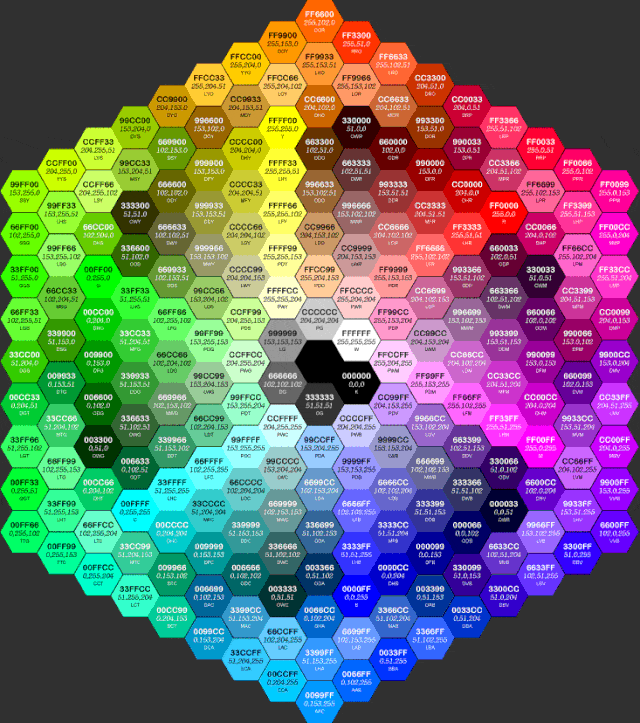
Hexa Tester

You've just seen the RGB model graphically expressed with hexadecimal notation. You can go back and copy the colors from the image, but it's better to understand it.
When you see a color in "#000000" format, if you've understood the RGB model, it's the same written differently (#-00-00-00: each pair of numbers or letters represents the amount of RED, GREEN, and BLUE).
Color quantities in HEX are represented with numbers and letters: 0, 1, 2, 3, 4, 5, 6, 7, 8, 9, A(10), B(11), C(12), D(13), E(14), F(15).
To understand the model well and how it works, you need to understand its formula... Don't be afraid, it's not complicated. Let's see an example with the color RED.
The red color in HEX is #FF0000. The amount of each color is equal to the first value multiplied by 16 plus the second value. So, FF would be: F (15*16=240) + F (15). In RGB, FF would be 255 (the maximum).
Don't worry if you haven't understood it. It's not necessary to memorize the formula, just know that the first value contributes more to the quantity because it's multiplied by 16, while the second value is only added.
The primary screen colors are easy to guess. Do you dare without looking at the first picture?
Great! RED: #FF0000, GREEN: #00FF00, and BLUE: #0000FF.
YELLOW is #FFFF00 (red and green at maximum). CYAN is #00FFFF (green and blue at maximum). MAGENTA is #FF00FF (red and blue at maximum).
WHITE (#FFFFFF) and BLACK (#000000) are easy. But what about grays?
If you remember, for grays, we mix the same amount of all colors, so the same 2 numbers or letters will repeat.
For a LIGHT GRAY, we can use #D0D0D0 (D is 13*16 and we add the second value 0). #D0D0D0 is the same as rgb(208,208,208).
For a DARK GRAY, we can use #5E5E5E, which is equal to 80 (5*16)+14 (E), that is, 94. rgb(94,94,94).
Remember that within the 3 pairs of numbers or letters, the first value "is more important" than the second?
Let's see an example with BLUE (#0000FF): Try modifying it like this: #0000F2. And then modify it like this: #00002F. Which has changed more?
Exactly! It changed LITTLE by touching the second value, but MUCH by giving it a very low first value (2), bringing it closer to black (darkening it).
Now, have fun experimenting! Mastering the HEX system is a matter of practice.
Color sample:
HSL (Hue, Saturation, Luminosity)
This model uses these three color properties to create a color.
The format is: HSL (color number, saturation %, luminosity %).
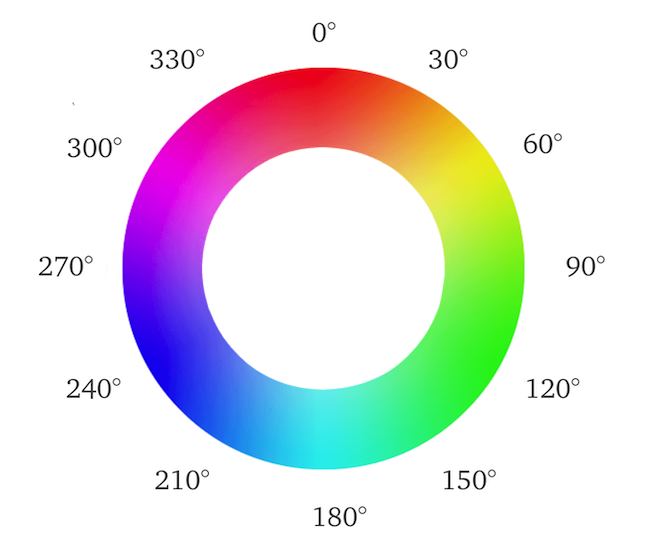
To set the color number, imagine a circle where red is at 0° (number for red: 0), green is at 120° (green: 120), and blue is at 240° (blue: 240).
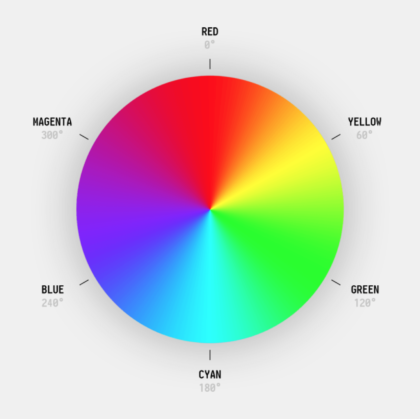
HSL Tester
Color sample: